date-website
Ads Admin Guide
Purpose
The Ads app controls the rotating banner graphics that appear on the public front page. Each entry simply links a banner image URL to an optional company landing page URL.
Access
- Sign in to the Django admin (
/admin). - Go to Ads › Ad urls (
/admin/ads/adurl/). The list shows every banner and the link it clicks through to.
Add a New Banner
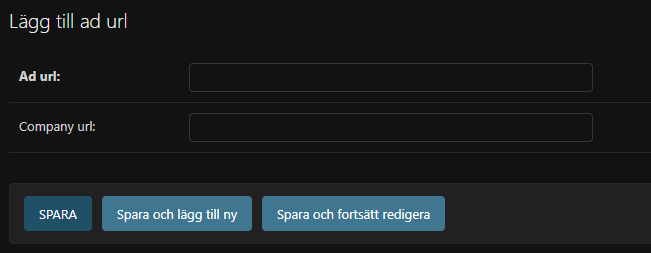
- Click Add ad url.
- Fill in the fields:
- Ad url – the direct link to the hosted banner asset (PNG/JPG/GIF). Use an HTTPS URL that is already uploaded to the media server or an approved CDN.
- Company url – where visitors should land when they click the banner. Leave blank if the banner is purely decorative.
- Click Save. The banner is live immediately.
Update or Hide an Existing Banner
- Click the banner entry from the list.
- Replace the Ad url or Company url as needed.
- Click Save. Use Delete if the campaign is over.
Tips for Non-Technical Editors
- Keep banner dimensions consistent with the existing creatives to avoid layout jumps.
- Always test the company URL in a new browser tab before saving.
- Remove stale campaigns promptly; the home page simply cycles through whatever records exist.