date-website
Archive Admin Guide
Purpose
Store and present historical material: photo galleries, document archives, exam libraries, and (when using S3) public files.
Apps & Terms
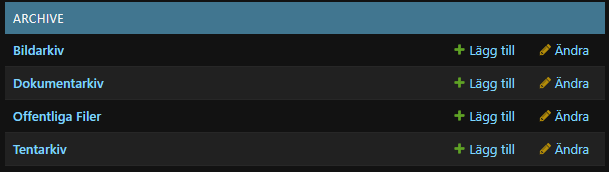
- Picture Collection – image galleries sorted by year. Each collection contains many photos.
- Document Collection – PDF or other documents grouped by year/topic.
- Exam Collection – student exam archives.
- Public Collection – files intended for anonymous download (only when S3 uploads are enabled).
Adding a Picture Gallery
- Visit Archive › Picture collections (
/admin/archive/picturecollection/). - Click Add picture collection.
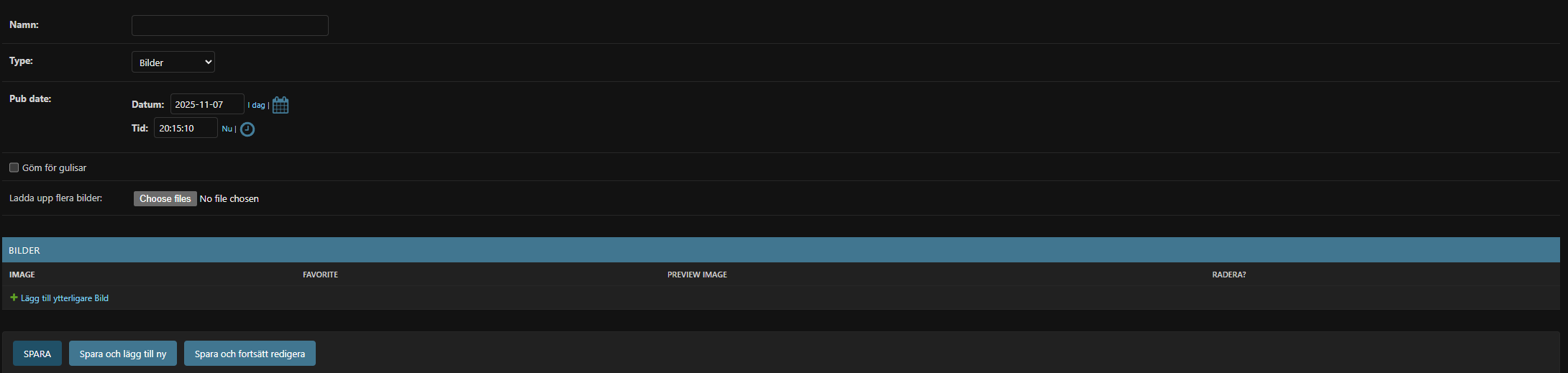
- Fill in:
- Namn – gallery title (also used as folder name in
MEDIA_ROOT). - Pub date – determines which year bucket the gallery appears under.
- Göm för gulisar – hide sensitive albums from freshmen (permission profile 1).
- Namn – gallery title (also used as folder name in
- Upload photos in the Bilder inline table:
- Click Add another Picture.
- Choose each image file (multiple uploads allowed thanks to the custom form field).
- Thumbnails appear after you save.
- Save the collection. Images are auto-compressed to 1600px width for performance.
Adding Documents or Exams
- Open Archive › Document collections or Exam collections depending on content type.
- Create a collection with title + publication date (Exam collections omit the “hide for gulis” option).
- Use the inline table to upload one or many files. Provide a descriptive Namn for each document.
- Save. Files are stored under
media/documents/<year>/<slug>/(orExams/...).
Public Files (S3 only)
- When
USE_S3=True, Public collections appear in admin. Manage them just like document collections, but uploads go through thePublicFileFieldso they are web-accessible without authentication.
Front-End Navigation
- Photos are listed per year at
/archive/years/and require member login (Gulisar may be restricted from certain albums). - Documents/Exams have table filters and search powered by django-filter and django-tables2.
Tips
- Use consistent naming and pub dates so archives stay orderly (e.g., “Sitzbilder 2024-05-01”).
- Deleting a collection also deletes its directory inside
MEDIA_ROOT, so double-check before removing. - For large uploads, prefer S3-enabled deployments to avoid filling local disks.